The Operating System Around AI Coding: 16 Months of Cursor Workflow Patterns That Actually Stuck
Workflow patterns from 16 months of AI-assisted SaaS work: agent chains, glob-scoped rules, capture-to-issue triage, CI as ops plane, layered security, automated PR review, and docs the model actually reads.
A year ago, I wrote about vibe coding lessons and agentic observability — early observations from building a production SaaS with AI-assisted development. Those posts captured what I was learning. This one captures what survived.
After ~16 months of building, about a year of structured Cursor workflow, meaningful monthly inference spend, and hundreds of markdown docs accumulated alongside the product, I've landed on a workflow system I trust. Not because it is theoretically sound, but because every piece of it answers a specific failure I already paid for.
The biggest mental shift: the code isn't the hard part anymore. The operating system around the code — how you plan, delegate, review, document, and hand off context — is where the leverage is.
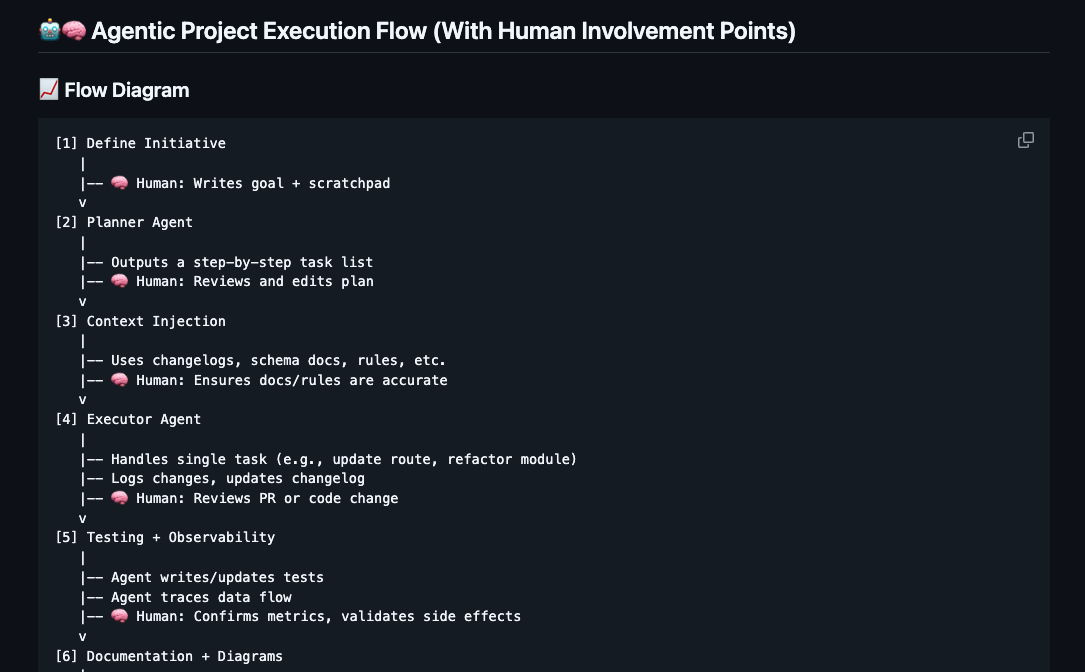
The Agent Chain: Plan → Execute → Review → Harden → Approve
The workflow is a multi-step chain formalized in .mdc rule files that auto-load based on file globs:
- Planner breaks tasks down with success criteria and estimation.
- Executor implements one task, then stops.
- Skeptical Reviewer (read-only) tears the work apart — correctness, scope drift, security, SQL safety — and produces a structured report: Blockers / Should Fix / Nice to Have / Questions for Human.
- Hardener (optional) fixes only the reviewer's flagged issues.
- Human does final review and approves.
The reviewer is the highest-leverage step. Solo across a full stack — UI, API, database, auth, CI — it is easy for a plausible change to drop a tenant predicate, or add a route without the right guard. The adversarial review catches what I would miss on a quick scan.
Topic-Split Lessons With Contextual Loading
Most developers who use Cursor rules end up with one giant lessons.md that balloons until it's useless — too much context for every session, diluting the signal.
We split ours into 6 domain-specific files: frontend, API, auth, data, deployment, and go-to-market. Each has a globs field controlling when it loads. lessons-data.mdc only loads when the agent is touching **/*.sql or **/migrations/**. The agent working on a React component never sees the 30+ SQL lessons, and vice versa.
The lessons themselves aren't generic advice. They're battle scars — highly specific to bugs we shipped and fixed. Each one records the exact code that broke, the exact fix, and which version resolved it. When the agent touches that area, the relevant lesson loads automatically. The same mistake doesn't happen twice.
This might be the single most transferable pattern in this post. If you're using Cursor rules, split your lessons by domain and scope them with globs.
Automated Bug Triage: In-App Capture → Issue Tracker → AI Diagnosis
The unusual piece: feedback never dies in a chat.
| # | What happens |
|---|---|
| 1 | Tester uses an in-app capture widget (screenshot, console, URL). |
| 2 | An issue opens automatically with that context. |
| 3 | CI classifies environment from the URL, tags the ticket, and hands structured payload to an automation that can read the repo. |
| 4 | A cloud agent searches the codebase and history, then posts a structured diagnosis (hypothesis, files, suggested fix, severity, confidence). |
| 5 | I open the ticket; the write-up is already there. |
Cost shape: small per-report inference cost plus a modest monthly fee for the capture tool; the glue in CI is free.
The distinction: classic observability is reactive (something breaks, you dig). This path is proactive from the reporter's point of view — confusion is filed, and a first-pass diagnosis with file references exists before I context-switch.
If you read agentic observability, that was about helping the model understand the system through logs. This is the next step: helping it diagnose from a human-reported slice of reality.
The Full QA Loop
| Phase | Flow |
|---|---|
| Intake | User → capture widget → tracked issue |
| Triage | CI → automation → diagnostic comment on the issue |
| Fix | Developer → feature branch → PR |
| Quality gates | Lint, types, format, tests, E2E on PR |
| Staging | Merge to staging branch → auto-deploy non-prod |
| Telemetry | Product analytics tagged by environment |
| Release | Verify non-prod → promote to production |
Major features sit behind per-flag controls so staging and production can diverge safely.
CI as the Ops Plane
Build, deploy, data movement, cache rebuilds, and triage automation all run through the same hosted CI provider instead of a pile of bespoke servers.
| Bucket | What it covers |
|---|---|
| Deploy | Path-scoped workflows so a UI-only change does not redeploy the world. Health checks on non-prod before we call a deploy green. Secrets from a vault, not copy-pasted into CI variables. Production promotion is manual — automation cannot accidentally ship prod alone. |
| CI | Static analysis, types, formatting, unit and integration tests, browser E2E on every PR. |
| Data | Scheduled cache rebuilds with validation and atomic cutover so readers never see a half-built table; occasional bulk re-ingest jobs sized to free-tier runner limits. |
| Triage | The capture → issue → automation pipeline above. |
Cost story: replacing a commercial ETL seat with jobs on free-tier compute dropped pipeline cost from "meaningful SaaS line item" to "rounding error." For a solo founder, that trade is hard to beat.
Reference Fixture Testing
We keep golden / reference fixtures — inputs with trusted expected outputs — and run the same pipeline the app uses in production. When our results drift from the reference, we ask whether our logic regressed or the reference changed.
That discipline has caught more real data bugs than unit tests alone. The largest catch was a systematic misattribution affecting a material double-digit share of rows — surfaced when our output went empty where the reference showed real rows.
Documentation as Infrastructure
Hundreds of markdown files sounds excessive for a pre-launch startup. Most of it was written with the code, not after: when the agent fixes something, the PR carries the explanation.
Key pieces:
- Getting-started paths — separate tracks for team members, developers, deployment, troubleshooting, and data analysis, each with a numbered reading order. This is for future hires, but right now the AI is the primary consumer.
- A command cheatsheet — every command we run more than once, organized by intent.
- A co-founder testing guide — step-by-step feature walkthrough for non-technical testers, with feedback flowing through Marker.io into the triage pipeline.
- An agent playbook — logging conventions, correlation ID patterns, structured log examples. Documentation for agents writing code, not humans reading it.
The key insight: documentation isn't overhead when the AI is the primary consumer. Traditional docs rot because humans don't read them. Our docs stay accurate because the agent loads them via glob-matched rules every session. When a doc goes stale, the agent produces incorrect code, we catch it, and update the doc. It's a self-correcting loop.
This is the deeper version of what I described in agentic observability — that post was about logs enabling AI comprehension. This is about all documentation serving as the AI's working memory.
Process Discipline: Checklists, Git Rules, and Handoffs
Mandatory 7-point documentation checklist — after every task. This exists because we ran a process audit and found 882 commits, 7 test files, and zero CI runs. We built quality gates from that. Then shipped them without updating any of the 8 docs that referenced testing or GitHub Actions. The checklist ensures that gap can't recur. Rules born from real failures stick better than rules born from best-practice articles.
Git discipline enforced at the agent level — the branching rule is alwaysApply: true, loaded every session. Two protected branches: main (production, manual deploy only) and dev (staging, auto-deploy on merge). All feature branches from dev with typed prefixes (feat/, fix/, docs/, refactor/, chore/). All PRs target dev first. When I say "commit this," the agent creates a feature branch, pushes, and opens a PR against dev. It doesn't ask which branch. It knows. And it refuses to target main.
Session handoffs — at the end of a productive session, a lightweight note to scratchpad.md captures what changed, decisions made, things tried and rejected, and the single next step. The expensive part of starting a new chat isn't finding the code — it's recovering the nuance.
Subagent delegation with explicit file boundaries — every background agent gets: mission (one sentence), files allowed, files explicitly forbidden, locked architectural decisions, stop conditions, and evidence required. The "files forbidden" list prevents agents from wandering into auth middleware, production config, or CI workflows uninvited.
How to Actually Set This Up — A Starter Architecture
Everything above sounds nice in the abstract. Here's the concrete structure that makes it work.
The .cursor/rules/ directory
This is the entire operating system. Each .mdc file is a rule that Cursor loads based on three strategies:
.cursor/rules/
  workflow.mdc           # Plan → Execute → Review cycle (always loaded)
  planner.mdc            # Planner responsibilities (always loaded)
  executor.mdc           # Executor constraints (always loaded)
  skeptical-review.mdc   # Review checklist + risk tiers (always loaded)
  branching.mdc          # Git strategy — protected branches (always loaded)
  project_structure.mdc  # Living architecture reference (always loaded)
  docs-checklist.mdc     # Post-task documentation checklist (always loaded)
  deployment.mdc         # Environments, workflows, config (always loaded)
  delegation.mdc         # Subagent prompt template (on-demand)
  session-handoff.mdc    # End-of-session format (on-demand)
  lessons-frontend.mdc   # globs: "**/*.tsx,**/*.ts"
  lessons-api.mdc        # globs: "**/services/**,**/routes/**"
  lessons-auth.mdc       # globs: "**/auth*,**/middleware/**"
  lessons-data.mdc       # globs: "**/*.sql,**/migrations/**"
  lessons-deployment.mdc # globs: "**/.github/**,**/workflows/**"
  lessons-gtm.mdc        # globs: (on-demand, business topics)
  README.mdc             # Index of all rules (always loaded)
Anatomy of a rule file
Every .mdc file starts with three-line YAML frontmatter that controls when Cursor loads it:
---
description: Auth0, MSAL, security hardening, token handling lessons
globs: "**/auth*,**/middleware/**,**/security/**"
alwaysApply: false
---
Three loading strategies — this is the mechanism behind contextual loading:
alwaysApply: true(no globs needed) — loads every session. Use for workflow rules, branching strategy, project structure — things the agent needs to know regardless of what file it's touching.alwaysApply: false+ globs — loads only when the agent is editing files matching the glob pattern. This is how lessons stay scoped. Your SQL lessons don't pollute a React session.alwaysApply: false(no globs) — on-demand only. The agent loads these when you invoke them by name ("write a session handoff") or when another rule references them. Use for templates and reference docs.
Anatomy of a lesson entry
Every lesson follows the same two-line format:
**Lesson:** [One sentence: what to do or not do, stated as a rule.]
**Context:** [When this was discovered, what broke, what version fixed it.]
Real example (generalized):
**Lesson:** When bumping a backend route's SQL timeout, you MUST also
override the frontend HTTP client timeout for every call site that hits
that route. The shared client has a 30s default that will abort the
request before the backend finishes.
**Context:** May 2026. Extended backend to 90s for complex queries, but
the frontend still had a 30s axios default. Users saw "timeout exceeded"
while the backend was still running. Fixed by adding a per-call timeout
constant and threading it through all 8 call sites.
The format works because it's scannable — the Lesson line is the rule, the Context line is the evidence. When the agent loads 30+ lessons for a domain, it can quickly pattern-match which ones are relevant to the current change.
Start here: the first 5 rules to create
If you're starting from zero, create these in order:
1. project_structure.mdc (alwaysApply: true) — Describe your file tree, key files, and naming conventions. The agent reads this before making any structural decision. Update it whenever you add a new directory, route, or service.
2. branching.mdc (alwaysApply: true) — Define your protected branches, branch naming, and PR targets. This is the rule that prevents the agent from committing to main. Keep it short and absolute — no ambiguity.
3. workflow.mdc (alwaysApply: true) — Define the Plan → Execute → Review cycle. Even a simple version ("implement one task, stop, ask for review") immediately improves agent behavior by preventing runaway changes.
4. lessons-<your-domain>.mdc (glob-scoped) — Create your first lessons file scoped to your most complex domain. Don't pre-populate it with generic advice. Leave it empty and add the first entry the next time a bug surprises you. Within a month you'll have 10-15 lessons that are genuinely useful.
5. docs-checklist.mdc (alwaysApply: true) — List the documentation files the agent must check after every task. Start with just changelog and project structure. Add more as your docs grow.
How the system grows
Don't build all 17 rules on day one. The system grows organically:
- Week 1-2: Create rules 1-5 above. You now have structure, git safety, and your first lessons file.
- Month 1: Your lessons file hits 20+ entries. Split it by domain — pull auth lessons into their own file with appropriate globs. Add a
deployment.mdcwhen you set up CI. - Month 2-3: You start using background subagents. Create
delegation.mdcwith the prompt template. Addskeptical-review.mdcwhen you realize the executor's output needs a second pass. - Month 3+: Context loss between sessions becomes expensive. Add
session-handoff.mdc. Your documentation starts drifting — adddocs-checklist.mdcwith specific files to check.
The key principle: every rule should exist because something went wrong without it. If you haven't felt the pain yet, you don't need the rule yet. Premature rules add context overhead without value. Reactive rules encode real knowledge.
Security and Privacy — Layered, Not Bolted On
Security is not a separate phase. It lives in middleware ordering, in review checklists, and in rules that load next to the files they protect.
Middleware order
Ordering matters: security headers must apply to error responses too — e.g. when rate limiting returns "too many requests," those responses should still carry the same header bundle as 200s.
| # | Layer | Notes |
|---|---|---|
| 1 | CORS | Strict production allowlist; unknown origins rejected, not logged-through. |
| 2 | Correlation IDs | Trace requests across services and logs. |
| 3 | Request timeouts | Bound hung upstream work. |
| 4 | Security headers | HSTS, frame denial, MIME sniffing protection, referrer and permissions policies. |
| 5 | Rate limiting | Stricter limits on sensitive routes than on general API traffic (exact numbers stay private). |
| 6 | Body parsing | JSON / urlencoded after the above. |
| 7 | Session / JWT validation | Bearer verification on user-facing APIs. |
Dual auth. Browser-oriented OIDC / JWT for customer APIs; separate API-key paths for machine callers. Internal routes register before the browser-auth stack so jobs and CI do not need interactive tokens.
SQL and tenancy. Parameterized queries only; every tenant-bound read/write carries a request-scoped tenant key in the WHERE clause. User rows are provisioned from identity claims via the same binding style — no string-built SQL.
Secrets and logs. Database credentials live in a cloud vault and hydrate at deploy. Client telemetry keys are substituted at build time so secrets never sit in git. CI masks sensitive values in logs. We also have a lesson born from a credential printed once in startup logs — that lesson auto-loads whenever server config is in play.
Privacy defaults. Party / contact tables store role and display fields, not full postal profiles where we can avoid it. Sensitive channels log masked identifiers. Internal tooling that can query data does so through allowlisted views, not arbitrary table browse.
Frontend CSP. Static hosting config ships a tight Content-Security-Policy; server-side header middleware defers "page CSP" to the SPA host but keeps the rest of the hardening.
Rules beside the code. An auth-scoped rules file loads when auth paths change, with lines like reject unknown origins in production and never log environment values. The skeptical reviewer asks: new routes authenticated? authorization checked? secrets absent from logs and error payloads? headers still coherent?
Signed webhooks. Verify signatures on the raw body before JSON parsing — if parsers run first, verification can fail in a silent, painful way.
Automated PR review: catches we would have shipped
We run automated PR review (vendor bot on top of human review). Representative classes of catch — each would have reached production without it:
| Class of issue | Why it stung |
|---|---|
| Header middleware ordered wrong | Throttled responses went out without the full security header set. |
| Build-time secret substitution broken | A "replace placeholder" step was a no-op because the real value had been inlined elsewhere — telemetry looked fine locally while CI lied. |
| Platform config gap | A host setting meant an environment variable never reached the Node process — silent misconfig, not a crash. |
| Database logic edge paths | Non-happy-path branches in generated SQL that first-pass review should have caught. |
We log many distinct bot catches internally; the pattern matches the rest of this essay: controls exist because we already paid for the lesson once.
| Lesson theme | What forced it |
|---|---|
| CORS | Early build logged and allowed unknown origins. |
| Secrets | Credential material in startup logs. |
| Headers vs throttling | Limiter ran first; automated review showed error traffic lacked headers. |
Risk-Scaled Review
Not every change deserves the same scrutiny:
- Tier 1 — read every line: Auth, SQL schema, migrations, CI/CD, billing, secrets, data integrity, financial calculations.
- Tier 2 — diff + behavior review: API routes, service logic, queries, caching.
- Tier 3 — outcome review: UI polish, docs, tests, non-behavioral refactors.
Estimation Calibration
In AI-assisted development, traditional sprint estimates overestimate by 5-8x. We estimate in hours: 1 sprint day = 1-2 hours focused. But external blockers (co-founder reviews, vendor setup) stay in calendar days. A task estimate reads: "~4 hours focused work + pending co-founder review (1-3 calendar days)."
The Takeaway
The biggest lesson after ~16 months: the workflow structure isn't overhead — it's what lets you trust the agent enough to actually move fast. Every rule exists because of a specific failure. They're not aspirational best practices. They're scar tissue turned into guardrails.
If you're building with AI assistance and find yourself repeatedly fixing the same categories of mistakes, stop and write a rule. If your context evaporates between sessions, write handoffs. If you can't tell whether a change is safe, add a review step. The patterns compound.
This post is the third in a series on AI-assisted development. See also: Vibe Coding Lessons with Cursor (May 2025) and Agentic Observability (June 2025).